Suitable
- 4.8
- Rating
- 50.00K
- Installs
- Free
- Price

 Analysis by App-foxy
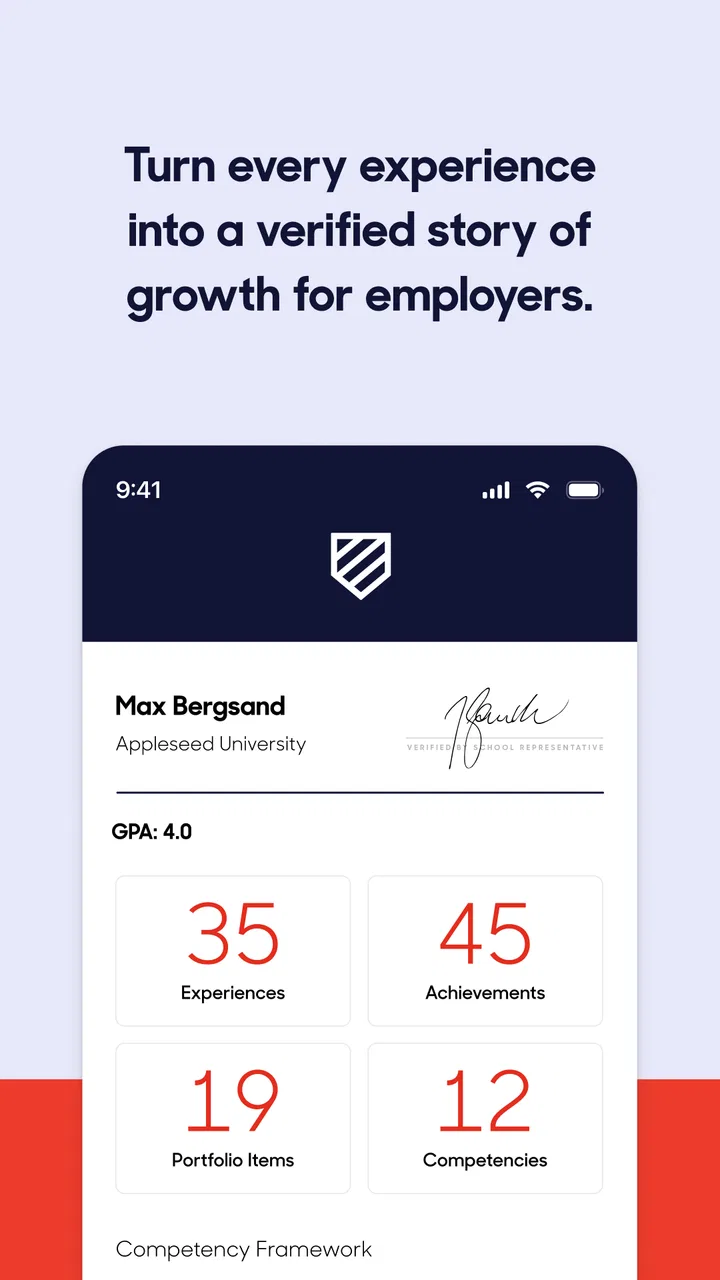
Suitable is an education app with a practical purpose: it helps students take what they do beyond the classroom and turn those activities into something they can present clearly to other people. I found that idea more useful than it may sound at first. Instead of treating learning as something that happens only during lessons, it encourages a student to notice projects, interests, volunteering, clubs, creative work, and other accomplishments as part of a wider personal record.
That makes it especially interesting for students who are building confidence gradually. You do not need to wait until you have a polished résumé or a long list of formal awards before starting. The app is aimed at making everyday effort visible, which can be valuable when preparing for applications, conversations with teachers, interviews, or simply reflecting on what you have actually done.
Suitable is free, rated for Everyone, and comes from the developer Suitable. Its average rating is 4.8 from around 600 ratings, while its reach has passed 50 thousand installs. Those figures suggest a focused education tool rather than a mainstream social network. I would approach it as a structured companion for personal development, not as a replacement for a school learning platform or a full professional networking service.
You May Also Like

 Blood Strike: 2.5 Anniversary
Blood Strike’s Loadouts Turn Every Drop Into a Tactical Gamble
A close look at Blood Strike’s custom loadouts: how fast access to signature weapons reshapes its battle royale rhythm, rewards preparation, and narrows the gap between fights.

 Pandora - Music & Podcasts
Pandora’s Music Is Easy to Start, but Harder to Recover
Pandora’s strength is its low-effort path from a seed to a station. Its weak spot is how much confidence it asks you to place in connection, setup, and quiet recovery.

 8 Ball Pool
 Is Built on Rivalries, Rematches, and Routine
A close look at the rivalries, rematches, shared routines, and unanswered safety questions that turn a quick pool match into a persistent mobile community.

 Samsung Music
’s Quiet Strength Is Playing What You Already Own
Its reach comes less from spectacle than from dependable access to a personal library. That simplicity is both the app’s strongest retention engine and its ceiling.

 AccuWeather: Weather Radar
AccuWeather Review: A Quick, Clear Forecast for Everyday Decisions
For everyday plans, the best forecast is the one you can understand quickly. AccuWeather makes rain timing, radar, and local conditions easy to act on, with a few trade-offs.

 Hill Climb Racing
Why Hill Climb Racing Still Turns Crashes Into One More Run
A tiny car, a bumpy hill and one more upgrade: Hill Climb Racing keeps resurfacing because its simple chaos makes every near-miss feel personal.
More From Our News Desk
View All News


How Suitable feels in everyday use
When I think about using Suitable day to day, the key question is whether recording an experience feels manageable enough to become a habit, rather than another school task to postpone. I would keep each note focused on what I did and what I learned, then revisit it when I have more time to reflect. That small distinction matters even more when an entry includes personal details, so it is worth considering what you choose to record and how much context it needs.
A quick start, with a different idea of productivity
The first thing I noticed is that Suitable is not trying to teach a conventional subject. There are no lessons to complete in the usual sense, and the value does not come from answering a sequence of quiz questions. Its purpose is closer to organizing and communicating personal progress. That changes how you should judge it: the important question is not whether it gives instant entertainment, but whether it helps you recognize and explain activities that might otherwise remain scattered.
For a student, the useful workflow is to think in terms of evidence and reflection. After taking part in an activity, you can consider what you contributed, what you learned, and how that experience connects to a larger goal. Even when the app itself feels simple, that mental habit can be powerful. It moves the user away from writing vague statements such as “I helped with a project” and toward describing a more meaningful outcome.
I would not call the experience demanding in terms of device performance. Suitable is the kind of app I would expect to open quickly on a reasonably maintained phone, because its role is organizational rather than graphically intensive. Still, perceived speed depends on the connection, the age of the device, and how much information the user is trying to manage at once. The app’s usefulness is also tied to how consistently the student records things, so a fast interface cannot compensate for an empty or neglected profile.
Why the app works best as a habit
The strongest approach is not to open Suitable once before an important application and expect it to create a convincing history automatically. I would use it as a small weekly routine. At the end of the week, spend a few minutes identifying one activity, one responsibility, and one lesson learned. That is less intimidating than trying to reconstruct an entire year later.
This is one of the app’s less obvious strengths: it can turn reflection into a repeatable process. Students often remember the headline of an accomplishment but forget the details that make it persuasive. Recording those details while they are fresh gives a future application more substance. The trade-off is that the app requires honest participation. It cannot discover meaningful experiences for you, and it cannot make a weak description sound authentic if you have not thought about the experience.
A useful tip is to write for a reader who knows nothing about the activity. Avoid assuming that a club name or school project explains itself. Describe the situation, your role, the action you took, and the result or lesson. This approach makes the information more useful later and helps Suitable function as more than a digital storage space.
Using it during a realistic school week
Imagine a student who spends Monday helping organize a school event, Wednesday practicing with a community group, and Saturday completing a personal creative project. None of those activities may look important when considered separately. By the end of the week, however, the student has examples of planning, teamwork, persistence, and independent work.
With Suitable, I would record each experience while the details are still clear, then review the entries together. The review matters because it reveals patterns. Perhaps the student repeatedly takes responsibility for organizing people, or perhaps the strongest evidence is a willingness to keep improving a difficult skill. Those patterns can guide future choices and make conversations with teachers or mentors more concrete.
This workflow also shows where the app is not a perfect fit. If you only want a simple checklist of homework, a calendar, or reminders for deadlines, a conventional productivity app will probably be faster and more appropriate. Suitable earns its place when the goal is to explain personal growth, not merely track tasks.
What happens when you use it heavily
Heavy use here is less about demanding graphics and more about the amount of thought and information a student brings into the app. A user who adds many experiences in one sitting may find the process mentally tiring, especially if each entry needs careful wording. That is not necessarily a technical weakness, but it is an important usability consideration. The app supports reflection best in small sessions rather than as a last-minute data-entry exercise.
I would divide larger work into stages. First, capture the basic activity while it is fresh. Later, improve the description and connect it to a skill or goal. Finally, review several entries together for repetition. This prevents every accomplishment from sounding identical and makes the overall record more convincing.
Another practical insight is to separate participation from impact. Simply attending an event is not the same as taking responsibility for part of it. If you helped, explain how. If something went wrong, note what you changed. If the result was modest, do not exaggerate it. A clear account of a small responsibility can be more useful than an inflated account of a large-sounding activity.
During longer sessions, the main performance concern is likely to be patience rather than processing power. Students may pause to remember dates, choose accurate wording, or decide which skills genuinely apply. That makes a stable, predictable interface more valuable than a flashy one. I found the concept better suited to thoughtful use than rapid browsing.
Stability and recovering from interruptions
For an education app that may be used between classes, after activities, or while preparing an application, reliability matters. A student should feel comfortable opening it for a short update without turning the moment into a technical project. Suitable’s focused design works in its favor because there are fewer reasons to expect the phone to work hard.
Even so, I would use a cautious workflow with any app that holds personal records. When writing an important entry, keep the wording concise until you are sure it has been saved, and revisit the record afterward. If the phone loses connection, closes an app unexpectedly, or runs low on memory, shorter stages reduce the amount of work that might need to be repeated. This is sensible practice, not a claim that a particular failure will occur.
Recovery is also about the user’s own organization. Keep a rough note of major activities in a separate place until they are properly recorded. That gives you a fallback if you change devices, forget details, or decide to rewrite an entry. Suitable can help organize your accomplishments, but I would not make it the only place where important application information exists.
The app’s current version is 1.46.0, and it has been available since March 21, 2016. That long presence gives it a more established feel than a brand-new experiment, while the current version number shows that the product has continued to evolve. I still recommend keeping the app updated through the normal platform process, particularly if you rely on it during an important school or application period.
Device limits and who should use it
Suitable supports devices running Android 8.1 or later. That is worth checking before installation, especially if you are using an older phone that has not received recent system updates. A compatible operating system does not guarantee identical performance on every device, but the app’s education-focused purpose should make it a reasonable candidate for ordinary phones rather than only high-end hardware.
Resource demands are likely to be modest compared with apps built around video, games, live collaboration, or constant media streaming. The more meaningful limitation is screen space. Writing and reviewing personal accomplishments on a small phone can feel cramped, particularly when you are editing several entries. I would use the phone for quick capture and review, then do careful wording in a more comfortable setting if the available tools and device setup allow it.
Students who share devices or have limited storage should also think about consistency. An app like this is most useful when the same person can return to it regularly and maintain a coherent record. If access is irregular, a simple notebook or document may be easier to keep available. Suitable is strongest when it becomes part of a dependable routine rather than another forgotten installation.
The Everyone age rating makes the app approachable for a broad audience. That does not mean every student will benefit equally. Younger users may need guidance in deciding what counts as an accomplishment and how to describe it responsibly. Older students may appreciate the structure more immediately because they can connect entries to applications, portfolios, or future conversations. In both cases, a teacher, parent, or mentor can add value by asking questions rather than rewriting the student’s story for them.
Where it beats ordinary alternatives
The usual alternative is to keep accomplishments in scattered notes, messages, documents, or a résumé that gets updated only when an opportunity appears. That approach is familiar, but it encourages selective memory. People tend to remember the biggest events and overlook the smaller responsibilities that show consistency. Suitable’s education focus gives those experiences a clearer place in an ongoing record.
It also differs from a school learning-management system. A classroom platform is normally centered on assignments, grades, announcements, and course communication. Suitable addresses the wider picture: what a student does outside formal lessons and how those experiences contribute to personal development. If your goal is to submit homework, check grades, or message a teacher, another tool is better. If your goal is to connect activities into a story about yourself, Suitable has a more relevant purpose.
Compared with a professional networking service, Suitable feels more appropriate for students who are still developing their experience. A public professional profile can create pressure to present a polished identity too early. A personal development record can instead encourage experimentation and reflection. The trade-off is that it may not offer the reach, networking, or employer-facing functions of a dedicated professional platform. I would use it to prepare your thinking, then transfer the clearest material into a résumé or application when needed.
There is also a difference between Suitable and a basic notes app. Notes are flexible and quick, but they leave the structure entirely to you. Suitable’s value lies in prompting a more deliberate connection between an activity and an accomplishment. If you already maintain an excellent personal system and review it consistently, the benefit may be smaller. For students who repeatedly say, “I know I have done things, but I cannot remember what,” the guided focus is more compelling.
Small techniques that make the record stronger
One technique I recommend is to record the obstacle, not just the success. A student who describes how they adjusted a plan after a problem gives a clearer picture of adaptability than someone who writes only that the project went well. This makes the record more credible and gives the student useful language for future interviews.
A second technique is to collect different kinds of evidence. Do not fill the record only with formal school activities. Include responsibilities at home, independent learning, creative practice, community involvement, and moments when you supported another person, provided they genuinely matter to your development. The point is not to create the longest possible list. It is to show a balanced picture of how you learn and contribute.
A third technique is to review entries for repeated claims. If every activity is described as proof of leadership, the word loses meaning. Replace broad labels with specific behavior: coordinating people, explaining a task, solving a disagreement, meeting a deadline, or continuing after an early failure. Suitable becomes much more useful when the student treats it as a place for precise reflection rather than a collection of impressive-sounding words.
Finally, keep the student’s voice intact. An adult can help with clarity and grammar, but an entry that sounds unlike the person who lived the experience will be harder to remember and defend. I prefer a simple, honest description over a polished paragraph filled with language the student would never use.
Who will appreciate it, and who should skip it
I would recommend Suitable to students who take part in activities outside lessons and want a better way to understand their own progress. It is also a good match for anyone who regularly prepares applications, portfolios, interviews, or personal statements and struggles to recall useful examples at the right moment.
Teachers, mentors, and families may find it helpful as a conversation starter. Instead of asking a student a broad question such as “What have you achieved?”, they can discuss a particular activity and explore the choices, challenges, and lessons behind it. That can lead to more useful reflection than simply counting certificates.
I would skip it if you want a full academic management system, a task manager, a social network, or a polished résumé builder with extensive formatting. It is also not ideal for someone unwilling to maintain entries. The app cannot create a meaningful record from occasional vague updates, and it may feel unnecessary if you already have a reliable system that you actively review.
My performance verdict
Suitable makes a sensible trade-off: it focuses on turning experience into understandable personal progress instead of trying to become an all-purpose education platform. Its expected performance profile is modest, which suits quick updates on ordinary compatible devices, while the real effort lies in thinking carefully about what to write. That is a strength for reflection, but it means the app is not a shortcut.
I found its best use in short, regular sessions: capture an activity, explain your role, note the challenge, and revisit the lesson later. This workflow reduces the pressure of reconstructing a year from memory and produces material that can support future applications or conversations. It also helps students notice growth that would otherwise disappear into a calendar.
Suitable is free, and that removes one practical barrier for students who want to try a focused development tool without committing to a subscription. My recommendation is strongest for users who need structure around accomplishments and weakest for users seeking conventional classroom features. If you are willing to contribute the reflection yourself, Suitable can turn scattered experiences into a clearer picture of who you are becoming.
After using it, my view is straightforward: this is a focused education app with a thoughtful purpose, not an app you install for instant results. Give it a regular place in your week, keep descriptions specific, and treat it as a working record rather than a finished résumé. Used that way, it can be a practical bridge between what you do outside class and how confidently you explain it to the world.
FAQs for Suitable
01What is Suitable and what can I use it for?
Suitable is an app designed to help users discover and evaluate options that match their personal needs, preferences, or circumstances. Depending on the features available in your region, it may provide recommendations, comparisons, or practical guidance. Before downloading, review the app’s store description carefully because the exact tools, supported categories, and available services can vary between Android and iOS versions.
02Is Suitable free to download and use?
Suitable may be available as a free download, but some features or content could require in-app purchases, a subscription, or an account. I recommend checking the pricing section in the Google Play Store or Apple App Store before installing it. Also look for information about free trials, automatic renewal, advertising, and cancellation policies so there are no unexpected charges after you begin using the app.
03Does Suitable require an account or personal information?
Some functions in Suitable may work without registration, while personalized recommendations or saved preferences could require an account. During setup, check which permissions and details the app requests, such as your email address, location, or profile information. Only provide information that is necessary for the features you want to use, and review the privacy policy to understand how your data may be collected, stored, or shared.
04Is Suitable available for both Android and iPhone?
Suitable’s availability depends on the developer and your country or region. Check the official Google Play Store listing for Android devices and the Apple App Store listing for iPhone or iPad. Make sure your device meets the stated operating-system requirements before downloading. If the app does not appear in your local store, it may not yet be supported in your area or on your device.
05Is Suitable safe and reliable to use?
Suitable should be downloaded only from an official app store or a verified developer link to reduce the risk of modified or unsafe versions. Before installing, check recent user reviews, the developer’s identity, update history, requested permissions, and privacy information. Like any app, its reliability can depend on your device, internet connection, and region, so keep it updated and avoid granting permissions that are unrelated to its main purpose.
Pros
- Simple interface makes daily planning quick and easy.
- Flexible tools can suit different routines and productivity styles.
- Useful for organizing tasks
- notes
- and personal goals in one place.
- Clean design keeps important information easy to find.
- Helpful for building more consistent everyday habits.
Cons
- Some useful features may require time to discover or configure.
- Customization options may feel limited for advanced users.
- The app may not replace specialized tools for complex project planning.
- Frequent reminders could become distracting without careful setup.
- Performance may vary depending on device and operating system version.

Suitable
Gallery